Hello,Baz,I have received an update from EPIC, version 1.0.2.10, but after trying to run it, the previous issue still persists.
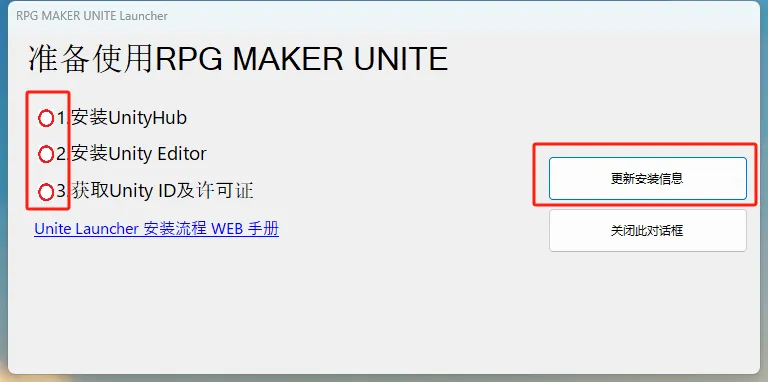
I tried clicking the "Install Unity Editor" button, and the Unity Hub prompted that the editor has been installed, version 2021.3.16f1. I confirmed that the editor has been installed.
I tried clicking on "Unity Editor Auto Detect" and the launcher prompted "Editor not installed".
I tried clicking "Directly Specify Editor" again and selected the Unity.exe file for the editor. The path to the file is consistent with the editor installation path on the Unity Hub, but the launcher still prompts "Editor not installed". I hope the developers can test and solve the existing problem.


Created at
Updated at
Sorry to hear about this!
First off, can you confirm that your Epic Store Launcher is up to date? You can usually know if you need to update it clicking on the top right icon:
Second, now that the Unity stuff is installed properly, have you tried to uninstall the Epic Store launcher and reinstall it. Maybe the fresh install will read it correctly.
Created at
Hello, I have downloaded and updated the EPIC client again, but the issue still exists. Is it a problem with the RPG Maker Unite Launcher? I estimate that some Epic users may also encounter this issue. I hope this problem can be resolved.
Created at
Did you try the second recommendation to uninstall and reinstall the Unite launcher?
Created at
Hello, as you said, I have reinstalled to ensure that the EPIC client is the latest and RPG Maker Unite is in the latest state. I have rechecked the version of Unity as 2021.3.16f1. By the way, I think the situation described in another post is somewhat similar to this one, you can refer to it.
/post/30239968102425 Software purchased on Epic
Created at
Thank you for bringing that post up. The developers are aware of this issue and can hopefully give an answer soon.
Created at
Hello,Baz,I have received an update from EPIC, version 1.0.2.10, but after trying to run it, the previous issue still persists.
I tried clicking the "Install Unity Editor" button, and the Unity Hub prompted that the editor has been installed, version 2021.3.16f1. I confirmed that the editor has been installed.
I tried clicking on "Unity Editor Auto Detect" and the launcher prompted "Editor not installed".
I tried clicking "Directly Specify Editor" again and selected the Unity.exe file for the editor. The path to the file is consistent with the editor installation path on the Unity Hub, but the launcher still prompts "Editor not installed". I hope the developers can test and solve the existing problem.
Created at
Updated at
是的,我又来了。现在已经完美解决了这个问题。
这个问题是中国用户的问题。
因为中国的unity hub版本是3.3.0,而国际hub的版本是3.7.0.
中国用户在epic购买的,只需要去国际网unity hub下载英文版,就可以完美解决。
一定要记住是最新3.7.0以上版本。删掉你在中国国内下载的unity。
unite官方可以发布一则公告来告诉更多的中国玩家。
Created at
是的,我又来了。现在已经完美解决了这个问题。
这个问题是中国用户的问题。
因为中国的unity hub版本是3.3.0,而国际hub的版本是3.7.0.
中国用户在epic购买的,只需要去国际网unity hub下载英文版,就可以完美解决。
一定要记住是最新3.7.0以上版本。删掉你在中国国内下载的unity。
unite官方可以发布一则公告来告诉更多的中国玩家。
Created at
Updated at
Thank you very much for this information! Ou Ju, can you verify this solution works for you?
Created at
Updated at
yes,im sure。 hub 3.7。