The large parts tile set is arranged incorrectly. 投稿者: soony 作成日: 更新日:
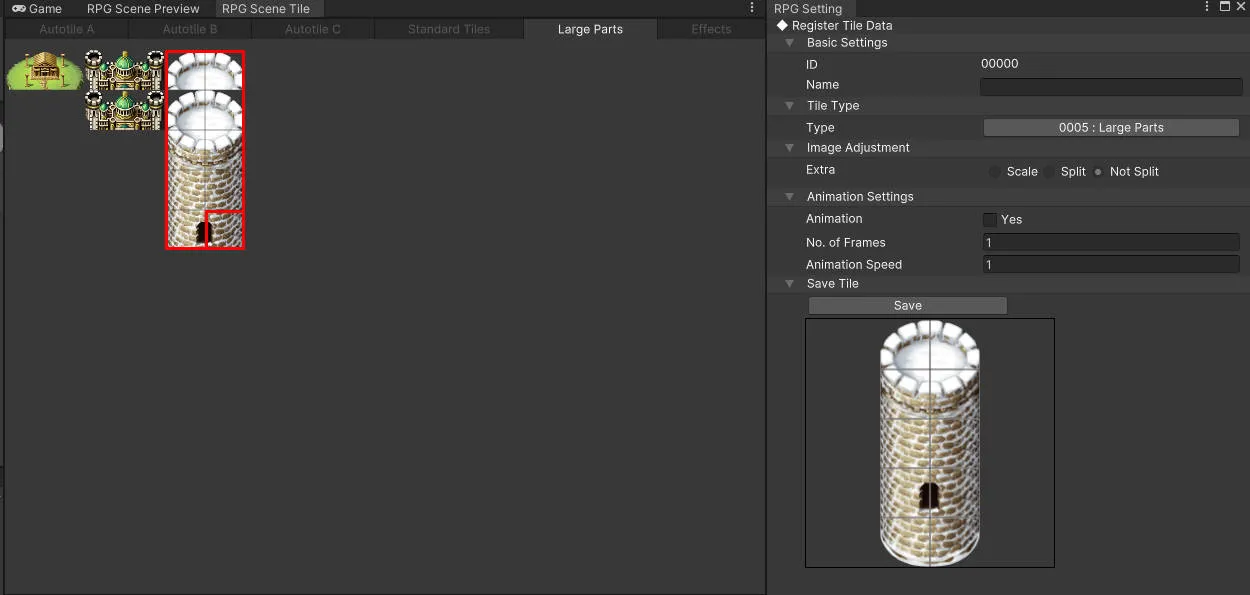
I want to save a large image from register tile data into the Large Parts Section, but after saving, the tile set is arranged incorrectly.
How can I fix this?
unity ver 2021Lts28
RMU ver 1.21
コメント投稿者: Baz 作成日: 更新日:
Hello!
The sprite cell size of the large part needs to be divisible by 96 on the width and height. That tower for example can fit on a 96 x 288 sprite sheet and that will load correctly. When you click save it will warn you if the image is not divisible.
投稿者: soony 作成日:
Thank you, Baz, for your suggestion. I opened the Tower image file directly and noticed transparent lines embedded in the image. I used an image editor to remove those transparent lines and adjusted the image size to be divisible by 96 evenly. This fixed the tile alignment issue.
However, making all these images usable takes a lot of time.
I believe there should be original versions of these images without the embedded transparent lines. How can I find them?
投稿者: Baz 作成日:
Ah you must be getting them from the Unite storage folders? Those will have the transparent lines because of what single tiles require. If you own MV/MZ (where these come from) you can get it from them. Otherwise try making a Unite Sample project and then pulling it from the storage of that. They have a lot of Large Parts images setup and ready to go.
投稿者: soony 作成日:
That's correct! I used those images from the Unite Storage folder.
As you mentioned, I was able to access the Large Part from the Unite Sample Project.
In MV, however, the images are combined into a single sheet, and the tiles are smaller than those in Unite. Using them requires additional time and effort to properly adapt them.
Anyway, thank you for pointing me in the direction!
投稿者: Baz 作成日:
Very true! It is one reason I made my Ace/MV/MZ to Unite asset converter:
It's also free for the remainder of the RPG Maker Jam 2025!
投稿者: soony 作成日:
Great, this tool really reduces a lot of work. It would be fantastic if there were an option to choose not to upscale and not to insert transparent lines into the tiles.
Because there are now AI applications that can upscale images while maintaining sharpness.
投稿者: Baz 作成日:
Oh does this one lose the quality? I made sure it was scaled with nearest neighbor in mind.
I can look into updating it, but it will be a ways out before that can happen.
投稿者: soony 作成日:
Good to hear that! It will be great news when this tool gets updated.


作成日:
更新日:
Hello!
The sprite cell size of the large part needs to be divisible by 96 on the width and height. That tower for example can fit on a 96 x 288 sprite sheet and that will load correctly. When you click save it will warn you if the image is not divisible.
作成日:
Thank you, Baz, for your suggestion. I opened the Tower image file directly and noticed transparent lines embedded in the image. I used an image editor to remove those transparent lines and adjusted the image size to be divisible by 96 evenly. This fixed the tile alignment issue. However, making all these images usable takes a lot of time. I believe there should be original versions of these images without the embedded transparent lines. How can I find them?
作成日:
Ah you must be getting them from the Unite storage folders? Those will have the transparent lines because of what single tiles require. If you own MV/MZ (where these come from) you can get it from them. Otherwise try making a Unite Sample project and then pulling it from the storage of that. They have a lot of Large Parts images setup and ready to go.
作成日:
That's correct! I used those images from the Unite Storage folder.
As you mentioned, I was able to access the Large Part from the Unite Sample Project.
In MV, however, the images are combined into a single sheet, and the tiles are smaller than those in Unite. Using them requires additional time and effort to properly adapt them. Anyway, thank you for pointing me in the direction!
作成日:
Very true! It is one reason I made my Ace/MV/MZ to Unite asset converter:
https://bazsupport.itch.io/rpg-maker-to-unite-asset-converter
It's also free for the remainder of the RPG Maker Jam 2025!
作成日:
Great, this tool really reduces a lot of work. It would be fantastic if there were an option to choose not to upscale and not to insert transparent lines into the tiles. Because there are now AI applications that can upscale images while maintaining sharpness.
作成日:
Oh does this one lose the quality? I made sure it was scaled with nearest neighbor in mind.
I can look into updating it, but it will be a ways out before that can happen.
作成日:
Good to hear that! It will be great news when this tool gets updated.